Technical Architecture
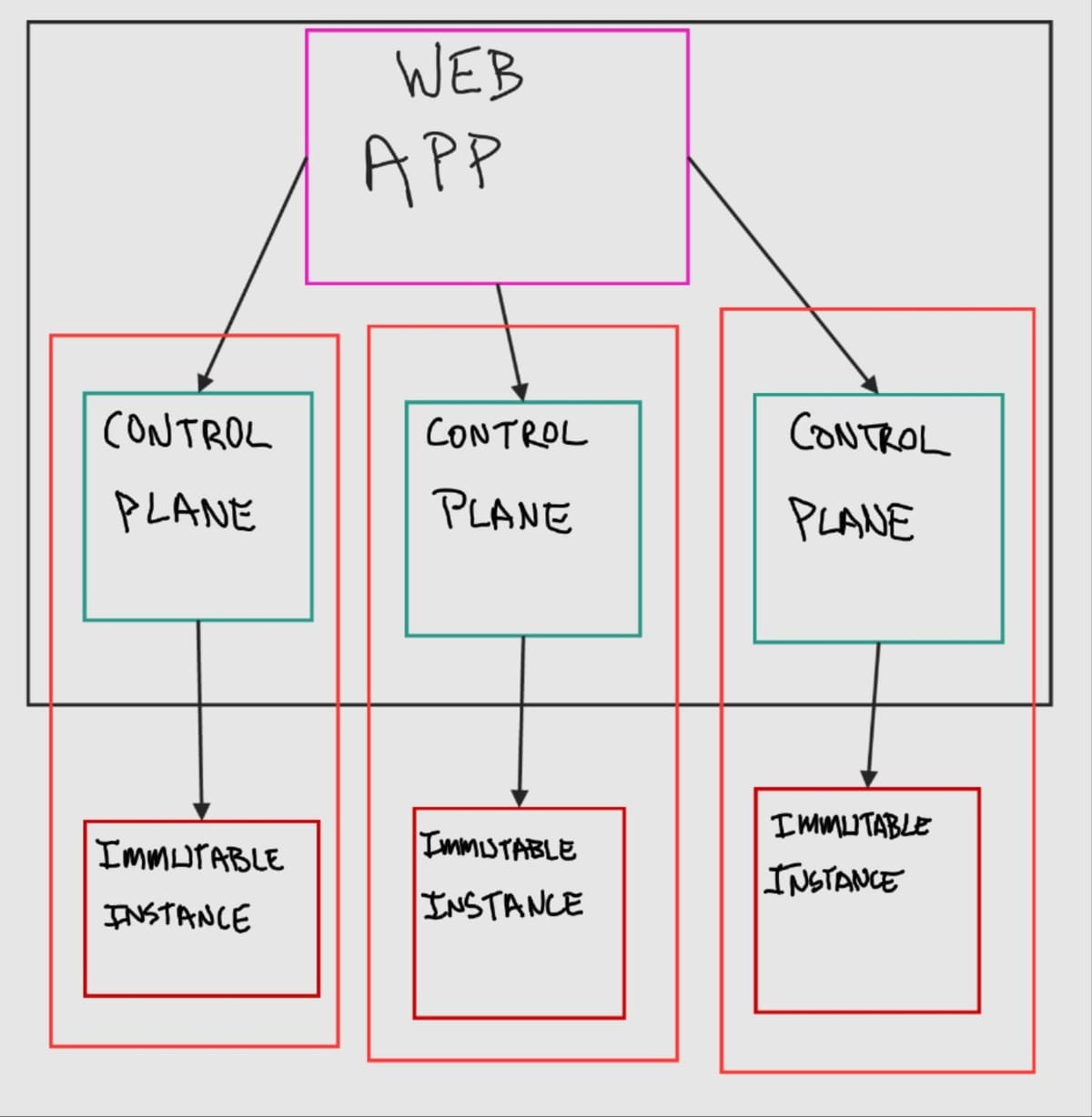
Nassella is made up of three major components: a multi-tenant web app, control plane instances, and immutable instances that host the end-user applications.
Applications that are deployed with Nassella live on an immutable instance. So if you deploy Nextcloud to cloud.example.org then users who visit cloud.example.org will be talking to the immutable instance running your Nextcloud application.
To modify or update an immutable instance you use a control plane instance. This can be your laptop or any other computer. The control plane instance will build a new image for deployment—based on a config—and then it will carry out the deployment of the immutable instance by deploying a new image, re-mapping application data, and updating DNS to point to the new instance (or using a dynamic DNS config), and then destroying the old instance. After deployment, users visiting cloud.example.org will be served by the newly deployed immutable instance.
The multi-tenant web app stores configuration data for all Nassella deployments and runs one or more control planes, as needed. It also provides a web-based user interface for configuring and managing immutable instances and running the control plane. The multi-tenant web app is an optional layer.
Immutable Instance
The immutable instance, which actually hosts an end-user's web applications, is made up of: the Flatcar Linux distribution, docker compose, and systemd services. Additional block storage is attached to provide mutable application storage.
Flatcar Linux is a Linux distro built for running Docker containers. It is an immutable OS that self-updates on a two-week schedule.
The control plane generates a docker compose config that contains everything needed to run the user's applications on the immutable instance. When the instance boots up, it runs a systemd service that calls docker compose up— bringing up all of the user's applications.
In addition, there is a systemd service that runs once per day and triggers a Restic backup snapshot to be taken and uploaded to the configured Backblaze B2 bucket.
The additional block storage, that is attached to the instance, stores all mutable application data. When an instance is being updated or moved, the block storage is detached from the old instance and attached to the new instance, unless the instance is moving to a different datacenter or service. If the block storage cannot just be detached and reattached, then the immutable instance will fetch the latest backup snapshot and restore it to newly created block storage on initial boot.
Control Plane Instance
The control plane instance is simply a Makefile with a set of shell scripts along with a config file and Terraform.
Whenever an update or modification to an immutable instance is needed, the configuration file, config/apps.config, is first updated on the control plane. Then make apply is executed on the control plane. make apply builds a new Flatcar ignition file and a new Terraform variable file. The ignition file is a read-only file that Flatcar Linux reads the first time it boots; essentially the control plane is building a read-only "image" to deploy for the "immutable instance". (Technically it only creates the config file that is loaded by a generic Flatcar Linux instance, but effectively creates an "immutable" image, due to the nature of Flatcar.) The ignition file contains the docker compose configuration as well as the Flatcar Linux setup, such as storage and system services.
After building the ignition file, the Makefile ensures that the Restic repository (for later storing backup snapshots) is initialized.
Then the Makefile executes terraform apply. Terraform uses the previously generated variable file along with a static Terraform configuration to actually carry out the deployment of the immutable instance. This allows for both the creation and destruction of VPS servers and the correct configuration of DNS records. make apply in this context is thus idempotent. Terraform will detect the current infrastructure setup and make any changes needed to bring it in line with the configuration. For example, if only the domain name is changed for an application running on the immutable instance, Terraform will only update the corresponding DNS record. If, however, the immutable instance image changes then Terraform will destroy the old immutable instance and bring up a new one with the new image.
The control plane instance can be used to manage one immutable instance. It is command-line and config-file-based. However, multiple control planes can be managed on one system, as the web app does. The control plane is designed to be completely independent from the web app.
Multi-tenant Web App
The multi-tenant web app consists of a CHICKEN Scheme-based web application, a PostgreSQL database, and an Authelia instance combined with OpenLDAP for storing and authenticating users.
The web app makes configuring and managing an immutable instance more user-friendly. It provides: a user interface for configuring; automation for deploying; a dashboard for creating, viewing, and restoring backup snapshots; and storage for the required configuration and Terraform state files. The web app can run multiple control plane instances at once to facilitate deploying and managing multiple immutable instances. Essentially, the web app is a user-friendly way to manage immutable instances, but it is not required.
Immutable Instance Details
The immutable instance itself is primarily centered around running Docker containers specified in a set of Docker Compose config files (that the control plane generates). The Docker Compose config files are all combined by a systemd service called app that then runs all of the user's selected applications by calling docker compose up.
The Docker configuration ensures all application configuration is read-only and immutable once deployed and that it is stored on the root Flatcar filesystem, which is destroyed every time an instance is updated or changed by the control plane. Any data that an application needs to be writable is specified as its own volume in the Docker Compose config and mapped to the attached block storage that always gets maintained and moved to updated instances. This ensures that all configuration is "data", preventing configuration "drift" while ensuring all user data is preserved.
The Docker configuration also creates separate Docker networks for each application. So if an application has a web app that needs a database, the database and web app will be on their own network. There is also a Caddy load balancer that has a separate network. Only parts of an application that need to be exposed to the internet are added to the load balancer's network. Only the load balancer is accessible from the internet.
There is an additional systemd service that runs once a day that creates and remotely stores a snapshot of all the user data stored on the attached block storage. Before creating the snapshot, all applications that write data to the attached block storage are shut down and web apps will return a "maintenance mode" page to users. After the snapshot is complete, all services are brought back online. This ensures the snapshot can cleanly capture all of the application data.
The immutable instance has no login method, not even via SSH.